

Hey folks,
As marketers, we are a strange audience. Something lands in my inbox and I'm grading the quality of the marketing before I've finished reading.
So this week we're showing our grades. Here are three things that hit our inboxes and feeds: a trial extension trade, an AI ad that crossed the line, and a discount that doesn't feel like a discount. Two to try, one to avoid.
—Nick

Brought to you by Tatari, the convergent TV platform bringing linear and streaming together.
Premium TV moments aren't just for consumer brands. With roughly the same spend as a comparable college football campaign, Gusto's postseason baseball placement drove nearly 3x the website visits and outperformed football placements per dollar.
Tatari's platform lets marketers buy premium streaming and linear placements through direct network relationships, then measure both as one connected campaign — broader reach, smarter buying, and a clearer view of what's driving response.
Our reviews of marketing that hit us this week.
1. Trade a trial extension for a review
Insight from Joey Noble, Creative Strategist at Demand Curve
Three days before our trial ran out, a tool we’re testing offered us two extra weeks. All we had to do was leave a review.
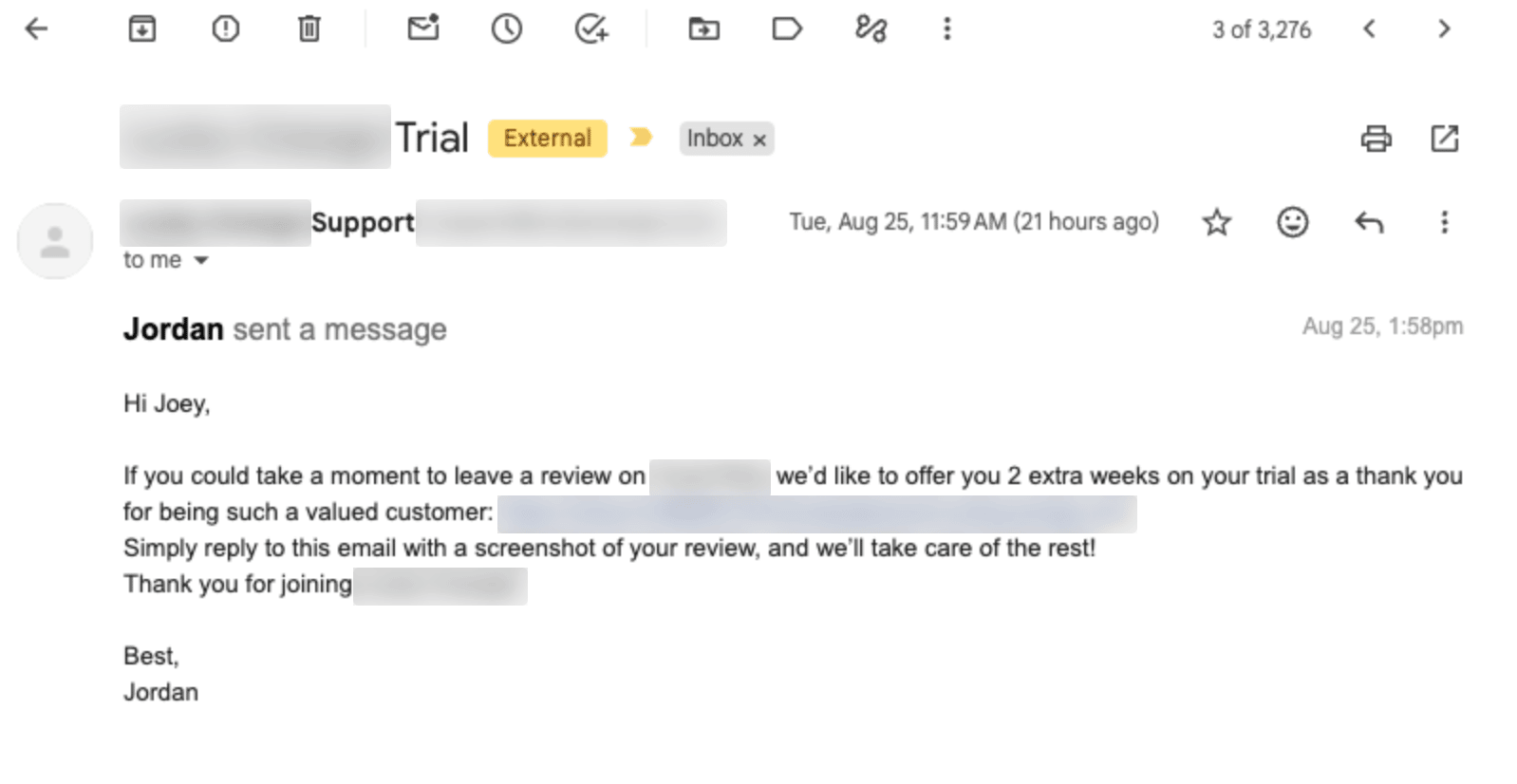
Good approach. Here’s why:
- It buys more time in the product. Two extra weeks is two more weeks of data piling up in the account, and more data makes this particular tool more useful. For any product that gets better the longer it runs, extending a trial is a cheap way to help people get real value out of it before they have to decide.
- It self-selects. Any trial extension does the first thing. This one adds a filter. The people who want two more weeks are the people already getting something out of it, so you’re sourcing social proof from the people most likely to leave you a good review.
- The small ask makes the big one easier. Psychologists call this foot-in-the-door: agreeing to a small request makes people more likely to agree to a larger one later. Writing a review is a small yes. Paying is the bigger one.
One catch: check your review platform’s rules before you send the email. You can offer a reward for a review on your own site, but some third-party review platforms don’t allow freebies in exchange for one. And never make the reward contingent on the review being positive.
2. Where AI video crosses the line
Insight from Devon Reynolds, Growth Strategist at Demand Curve
AI video has gotten really good. Cheaper creative, faster testing, better-looking ads than most brands could afford to shoot. But there's clearly a line somewhere, and this ad crossed it.
I got served an Instagram ad for a puzzle. At first it looked like a normal product video. Then I noticed the pieces weren't fitting together right. Some of them appeared out of nowhere as the puzzle came together.

Watch the flower's center fill in on its own. The petals change shape too.
My immediate reaction wasn't "oh, this is an AI ad." It was "wait, is this product even real?" Or “were they showing me something the real product can't do?”
There's an ethical question here, but I think the business argument is more interesting. AI lets us make good-looking creative fast and cheap. Use it to simulate the actual product, though, and you risk undermining trust in the entire company. The second I caught the fake puzzle, I questioned everything else they were telling me. The same video says these are waterproof, for example. Why would I believe that now?
Right now brands get caught because a hand looks weird or the puzzle pieces don't fit correctly. Soon those tells may disappear. So "will people notice?" probably shouldn't be the standard for whether you do it. A more useful test: does this create an expectation of the product that the real product can't meet? This goes beyond physical products. Imagine an AI-generated SaaS demo showing functionality that doesn't actually exist, or an AI-enhanced hotel room that looks much better than the real one.
Cheap synthetic creative might make the human stuff more valuable. Real product demos, customer videos, screenshots. As feeds fill up with AI, those become the strongest trust signals you have.
3. Turn your discount into a credit
Insight from Nick Costelloe, Content Lead at Demand Curve
Cadence, an electrolyte brand I've bought from before, sent me a win-back email last week. The way they framed it is worth trying. Here's the email:
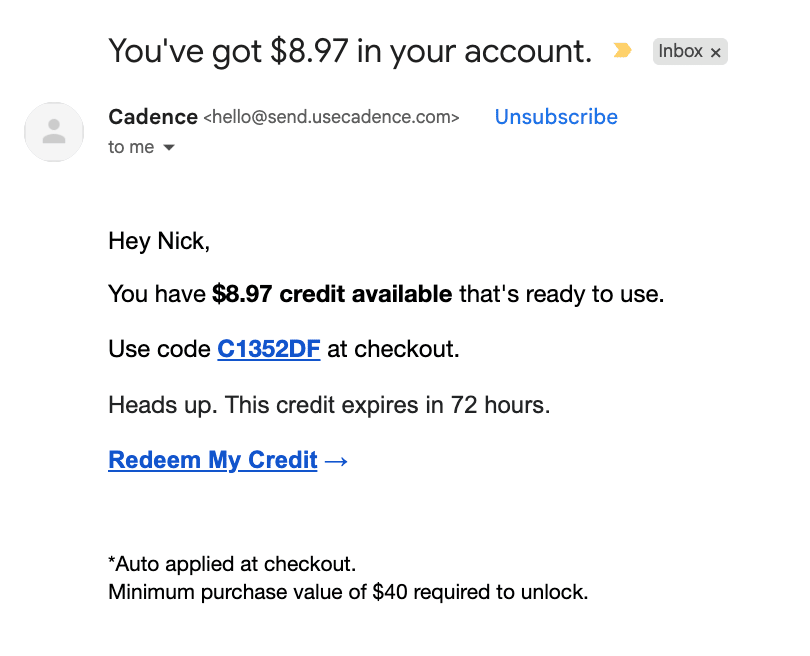
Simple, sure. But it’s a reframe too few companies use.
Offer 20% off your next order and the customer loses nothing by ignoring you. Put the same amount in their account as a credit and ignoring you means throwing money away.
We value a thing more once we feel we own it. That's why losing something you own stings more than missing out on something you never had. The discount is the same, it just doesn’t feel the same.
Now look at the number they picked. Not $10 off. $8.97. Brands don’t round a promo to the cent, so it reads like a balance someone calculated for me. The subject line says “in your account.” The body says “credit available.” And the minimum purchase is visible in the email, not an unpleasant surprise when you hit the redeem page. The whole email looks more like an account notification than a promo.
Then you get 72 hours before the money you supposedly own disappears.
News you can use
- Meta's taking placement exclusions out of ad sets. There's a notice showing up in Ads Manager: no more excluding placements, platforms, devices or operating systems at the ad set level. No date on it. Jon Loomer, who caught it, thinks it's a test on Sales and Leads campaigns only for now, and that value rules are what you'll use instead. (Jon Loomer)
- Google's testing channel controls inside PMax. It's an alpha called Channels, and you nudge Search, YouTube, Display, Discover, Gmail or Maps up or down. Up means Google will accept a worse CPA there, down means it won't. Not a budget split. Be careful with it: if YouTube's CPA looks bad because Search is taking the credit, turning YouTube down can wreck Search too. (Search Engine Land)
- Google's auto-expanding AI Overviews on some searches now. No "Show more" click, the whole answer just loads, an AI Mode box sits under it, and your links get shoved down the page. Google confirmed it and won't say how many queries. Definitions are the one spot it shows up reliably, so go pull your "what is" queries in Search Console while you've still got a baseline. (Search Engine Land)