

Conversation


🥳 Feedback Received!
Thanks for taking a moment to share your thoughts — it genuinely helps us make each chapter sharper.
What happens next:
- Your feedback goes straight to our product team.
- We’ll use it to refine lessons, clarify examples, and make the program even more useful.
Appreciate you helping make this program better for everyone.
Ready for your next challenge? 👇
Project: Cold Email
This project walks you through a test cold email campaign, from start to finish.
Phase 1: Find emails
Use what you’ve learned from the readings to figure out scalable ways to get email addresses of potential customers.
Are you going to be using a tool like Clearbit? Scraping websites? Cross-referencing Crunchbase with LinkedIn? Reference our reading on how to find emails as you go.
This will involve a lot of research. If you can’t find real, living and breathing emails, you need to keep searching. At Demand Curve, it usually take us multiple days of research to come up with viable strategies.
Come up with at least three strategies that result in real emails.
Don’t stop until you have at least four real email addresses within each strategy you come up with. That's at least twelve emails total.
This helps us prove that your approach is good enough to do at scale.
Don’t spend time getting more than the first four emails. Only gather enough to prove your approach can work. We'll generate giant lists later.
Put the emails you found in a spreadsheet and save them.
Phase 2: Draft your strategy document
Draft a document in Dropbox Paper that answers the following questions:
Who will I be targeting?
Include job titles, company size, and anything else that is relevant when it comes to finding their email or tailoring the message they get.
Improve your targeting by drilling deeper into their pain points and where they are in the customer journey (use your value props).
How will I be getting their emails?
Pull this from Phase 1.
What does an initial test look like?
How many emails should you send to start? How will you know if you’ve succeeded? What’s the next step after the initial email?
Check out the example strategy document based on what Demand Curve has given a real client (identifying details removed).
Phase 3: Write copy
Draft up a document with the initial cold email copy. Make sure you’ve read our Email Copy reading first.
Make two versions that have a very different message from each other. Within those, make a long and a short version.
Check out our email templates. You can use the same overall layout as the templates, but craft your own emails. Only reference the copy when you get stuck — good copy varies market-to-market.
Phase 4: Test on yourself
Send an email to yourself in Gmail. Put yourself in the shoes of a prospect receiving the email. See if it looks spammy.
Look at the snippet you see in the inbox first.

Then open the actual email. At Demand Curve, we’ll actually boomerang the email to ourselves to be sent in a day, so it looks fresher when we actually read it.
Make sure everything looks compelling. If not, change what needs to be changed.
Phase 5 (optional): Test that you don’t go to spam
Use Glock or Litmus to double-check that your emails will pass your recipient’s spam filter.
Generally, you won’t have to worry about this until you’re sending emails out on a massive scale (1000+ emails/day).
Make sure to cancel Litmus before your free trial is up or they’ll charge you a boatload.
Phase 6: Gather emails
Make sure you have at least 100 emails of prospects loaded into a spreadsheet. Go through each prospect, research them, and add a blurb about how you’ll personalize your email to them in a separate column.
Anything less than 100 emails means you won’t get reliable data.
Phase 7: Make safety email address
When you send your initial test emails, there’s a small chance your address will go to spam or get blacklisted. You’ll want to create a separate subdomain for sending cold emails so that if anything goes wrong (rare), it won't trash your main domain.
Have this be for the highest-ranking person at the company — ideally the CEO if you have their permission. Emails from them tend to get much better response rates.
For example, if your usual email is jsmith@company.com, make a separate email address for jsmith@e.company.com to actually send emails from.
This way, if anything goes wrong (rare), you haven’t trashed your main email. Great.
Next, upload a picture of the person whose email you’re using, otherwise the account will look fake when people mouse over their name in gmail. This boosts response rates 30-50%.
Phase 8: Learn mail merge
Now, install Yet Another Mail Merge. We’re going to test safely that we can send out multiple emails, without emailing another human being.
Make a Google Sheet like below:
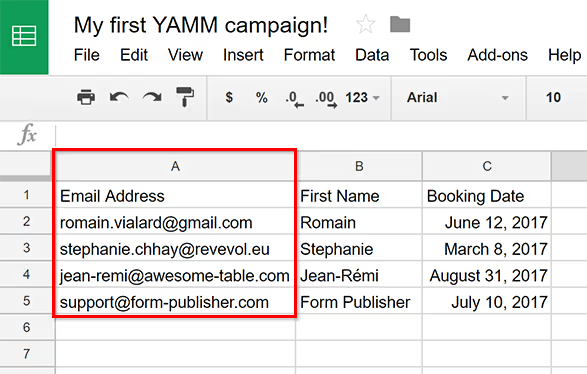
Add only your own email address, and then add one that’s generated from Mailinator. Don’t use real email addresses yet.
Follow steps 2 and 3 here.
Then, go to your email and the Mailinator inbox. Double-check that the emails looks how they should.
Phase 9: Checklist
Follow this checklist. It’s what we use internally at Demand Curve.
Phase 10: Go live
Add the real emails of your prospects to the Google Sheet. Plug in the right variables. Send away.
Use Mail Merge or send manually through Gmail if you need the flexibility to personalize your emails on the fly. We recommend using Gmail to start and backing into using Mail Merge if it’s too time-consuming.
And see those sweet, sweet leads start to come in!
Phase 11: Get data
The more expensive your product, the longer it tends to take to get good data, since people may take a long time to actually purchase and move through your funnel.
Check back after 4-5 days.
Then, make a spreadsheet with all the important data you need (hint: it’s in our reading on Sending Cold Emails). Figure out whether it’s profitable for you to continue.