
A new class of marketer is building their own tools with AI. Bespoke software tailored to exactly how they work. No engineering team required.
Jonathan Martinez, founder of GrowthPair and longtime DC partner, is one of those frontier marketers. And he's joining us today to share his build vs. buy decision framework, plus a deep dive into how he built a custom content intelligence system in a day.
How I stopped paying for content tools and built my own
By Jonathan Martinez, CEO of GrowthPair
Every marketer has a drawer full of abandoned SaaS subscriptions. Tools that were supposed to save hours, shipped with features designed for someone else's workflow, priced for teams of ten.
I tried Taplio. I tried the rest. None of them fit the specific way I needed to research, analyze, and iterate on LinkedIn content while building GrowthPair's brand from 3,000 to 26,000 followers. So I unsubscribed from everything and went manual: 45–90 minutes a day scrolling LinkedIn and X, bookmarking, pattern-matching by hand. When you're writing 4–6 posts a week, that time adds up fast. And the bigger problem isn't efficiency; it's that staring at a feed hoping for inspiration is a terrible ideation process.
Then Claude Code came out. And in about eight hours of total work, I built a tool that replaced all of it.
This isn't a story about my tool. It's about a decision every marketer is about to face: when should you build your own, and when should you buy?
The moment the math changed
For most of marketing history, "build" meant "hire an engineer." That put custom tooling out of reach for anyone without a technical co-founder or a dev budget. The rational move was to buy the closest SaaS and live with its compromises.
AI coding tools broke that constraint. Not in a theoretical way. In a practical, "I have zero engineering background and I built a working content intelligence system over a weekend" way.
The shift isn't that building got slightly easier. It's that the entire cost structure flipped. When "build" meant $15,000 and three months of dev time, the bar for "buy doesn't fit" had to be extremely high. When "build" means $10–20/month in API costs and a few focused afternoons, the bar drops to: does this off-the-shelf tool actually match my workflow?
For most marketers, the honest answer is no.
What I built (and what I deliberately didn't)
I call it Content Machine 2000, a LinkedIn content intelligence system built with Claude Code and Apify's API for data scraping. It runs locally on my machine. Here's what it does:
Morning briefing. Every day I get a dashboard: my engagement stats, top-performing posts for the week, and content gaps I haven't covered.
Research scraper. It finds AI and marketing posts getting high engagement on LinkedIn using Apify actors, which handle the scraping on their own servers without connecting to my LinkedIn account. I see what's resonating before I open the app.
Trend tracker and lookalike content. It surfaces the topics getting the most engagement in my niche, then takes my top-performing posts and generates new angles on them. Not new posts. New angles, a distinction I'll come back to.
Here's where this gets concrete. The trend tracker recently surfaced "job market disruption and the junior marketing crisis." That topic wasn't on my radar at all. I wrote a post about junior marketers that beat my typical impression count (I usually land 2,500–3,500 per post). I wouldn't have come up with it on my own.
That trend then sparked a second post: "Can we stop AI bro marketing?", a PSA against people claiming they're replacing entire marketing teams with AI. The tool connected the job market disruption trend with something I'd already been noticing. It was like webbing what I'd already been seeing with fresh inspiration from a trend I would have missed.
When you're publishing 4–6 posts per week, writer's block is real. The trend tracker eliminates it. Not by writing for you, but by giving you starting points grounded in what's actually resonating.
Narrative arcs. This might be the most useful feature I built. The tool tracks my content pillars (the recurring themes I write about) and shows how long it's been since I last posted about each one.
Right now my dashboard reads something like: Last posted about Claude Marketers Academy: 8 days. Last posted about GrowthPair: 33 days.
I rotate between 3–5 pillars each week based on this data. It prevents audience fatigue on any single topic while making sure I don't accidentally neglect a pillar for a month. The repost feature ties into this too. I used narrative arcs to time a repost about Claude Marketers that hit 101,730 impressions, because the data showed it had been long enough since I'd last covered that topic.
No off-the-shelf tool tracks your personal content pillars and tells you when to rotate. This is the kind of feature that only exists when you build for yourself.
Content recycler. It identifies past top performers worth reposting. Reposts pull roughly 80% of the original engagement, which means my best thinking compounds instead of disappearing into the feed after 48 hours.
Analytics dashboard. Best days to post, short vs. long post performance, engagement distribution by topic. The kind of analysis I used to do in spreadsheets once a quarter, now available whenever I want it.
Engagement scraper. It finds people engaging with content in GrowthPair's ICP, giving me a warm outreach list built from real signal instead of cold filters.
Here's what I deliberately left out: writing. Content Machine 2000 doesn't generate posts. I dialed that feature back early. The tool handles ideation, intelligence, and analytics. Every word I publish is mine.
That was a deliberate choice, not a technical limitation. The value of thought leadership collapses the moment the thinking isn't yours. The tool makes me faster at finding what to say. It doesn't decide what I say.
I also chose not to build auto-posting or auto-scheduling. Programmatic posting carries real risk of LinkedIn flagging your account. Not worth it when manual posting takes thirty seconds.
How the build actually went
Total time: about four hours for the MVP, another four hours of polish spread across a week. My engineering background: zero.
The process:
- Start with a detailed prompt. I described myself, my content goals, my audience, the specific problems I wanted solved. The more context you feed Claude, the better the output. I also fed it my full content library so it understood what I'd already posted.
- Ask Claude to ask you questions. This is the single most useful practice I found. Before building anything, tell Claude: "Ask me clarifying questions before you start." It will surface edge cases and requirements you hadn't considered.
- Let it propose an MVP. Claude suggested a feature set and architecture. I reviewed it, said "build it," and iterated from there. The first version wasn't polished. It worked.
- Iterate in conversation. Things broke, mostly API connection issues between Claude Code and Apify. I described the problem, Claude fixed it. Every feature I wanted, I was able to build.
The tool runs on localhost. I could deploy it to Railway for access from any device, but since I'm the only user, there's no need.
Cost: $10–20/month for Apify API access. The SaaS tools I replaced ran $50–150/month and did less.
The build-vs-buy framework
Not everything should be built. Here's how I think about the decision:
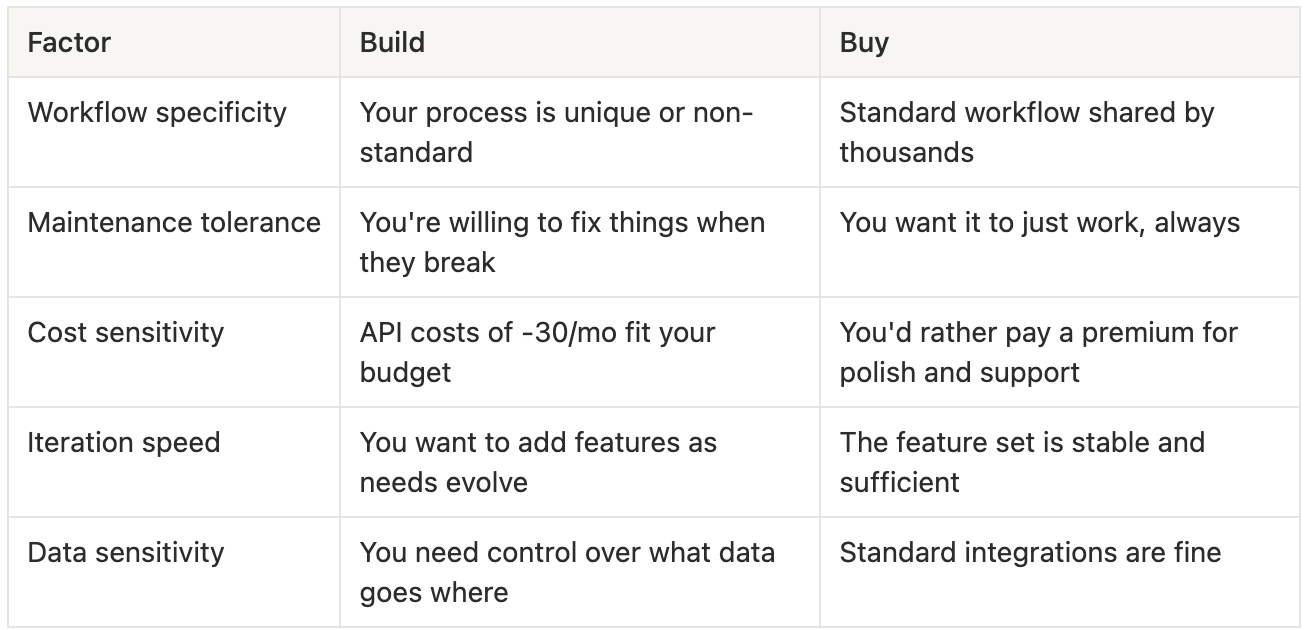
The honest version: buy when the off-the-shelf tool genuinely fits your workflow. Many do. If Taplio or Shield or whatever tool works the way your brain works, pay for it. The time you save on maintenance is worth the premium.
Build when you've tried the tools and keep fighting them. When you find yourself exporting data to spreadsheets, manually combining features from three different products, or wishing for one specific integration that doesn't exist, that's the signal.
The new variable is that "build" is no longer a major commitment. It's an experiment you can run in an afternoon. The worst case is you waste four hours and learn something about Claude Code. The best case is you build exactly what you need for a fraction of the cost.
What to know before your first build
A few things I wish someone had told me:
Block out 2–3 hours for your first session. There's a learning curve, but most people hit an "aha moment" within the first build where the possibilities click.
Your first output won't be polished. That's fine. You're building an internal tool, not shipping a product. Functional beats pretty.
Feed Claude everything. Past work, examples of what you want, descriptions of your workflow. Context is the raw material. More of it produces better results.
Ask Claude to explain what it's doing. You'll learn faster and catch issues earlier. You don't need to understand the code, but understanding the logic helps you direct the next iteration.
Look into existing frameworks. Gary Tan's G-Stack is a set of rules and guardrails for Claude Code projects that can save you setup time. You don't need to start from scratch.
The real unlock
The insight isn't "Claude Code is cool" (it is). It's that the marketing stack is becoming personal. Off-the-shelf tools are built for the median user. The median user doesn't have your specific audience, content strategy, posting cadence, or analytics needs.
For the first time, the cost of building exactly what you need is low enough that settling for close-enough is a choice, not a constraint. That changes the calculus for every marketer willing to spend a few afternoons learning how the tools work.
The value here isn't one dramatic before-and-after moment. It's cumulative. I cut my daily scrolling time in half or more, saving roughly 30 minutes a day. Over 5–6 days a week of posting, that's 12–15 hours a month I used to spend hunting for inspiration that now goes to actual writing. I went from staring at feeds to having dozens of queued post ideas generated from real engagement data. My goal is to grow from 26,000 to 50,000+ followers over the next year, and the analytical edge from custom tooling is a real part of that plan.
If you want to go deeper: I'm launching Claude Marketers, a video course for marketers who want to learn Claude Code from scratch. It covers the basics of Cowork, Code, GitHub, deploying apps, and connecting APIs. Currently raffling 5 licenses to our advanced course. Comment on the Product Hunt listing to enter →
Wrapping up
We had a blast nerding out with Jonathan while collabing on this edition. We hope you enjoyed it just as much. Next week, we'll be wrapping up the three-part series on how startups can win the AI search game.
Stay tuned. And until then, have an awesome weekend!