Today, we focus on one of the most important marketing and sales assets you will ever have for your business.
The landing page.
Today, I've got a cheatsheet, high-level tips, and a thorough guide for you.
Let's dive in.
– Neal

Brought to you by Arcads.
UGC works.
But, that person you hired will likely only do a few variations—at least within a reasonable budget.
Instead, this AI tool lets you create dozens of UGC ad variations in seconds—all thanks to AI actors.
Test tons of hooks and angles with a fraction of the time and cost.
Try arcads.ai today and improve your ROAS.
Note: No, they aren't perfect. But they let you rapidly test to find winners—then you can hire real actors to re-do them.

Brought to you by Coho AI
Analytics tools show you a bunch of data. CRMs track your leads. Email/messaging tools let you contact them.
But none tell you when someone is ready to buy or what you should do to keep them coming back.
That's where Coho AI comes in: Connect all your tools, and their AI will analyze your users to create high-value segments and tell you exactly what you need to do to get them to convert and keep coming back.
Think of it as adding a genius data analyst and marketer to the team.
Start with a free report that uncovers:
- Your most valuable users
- Hidden segments
- Opportunities to improve communication
The perfect landing page checklist
Insight from Tuff Growth and Demand Curve.
Your marketing efforts are wasted if the landing page sucks.
Luckily, it's a good idea to use a proven template rather than get too creative.
Wait, don’t I constantly tell you to be creative?
Yes, 100%, your marketing needs to be creative to stand out.
But creative layouts confuse people.
So, be creative with marketing (ads/content/email) and practical with conversion.
Here's a checklist for nailing the perfect landing page (high-res version):
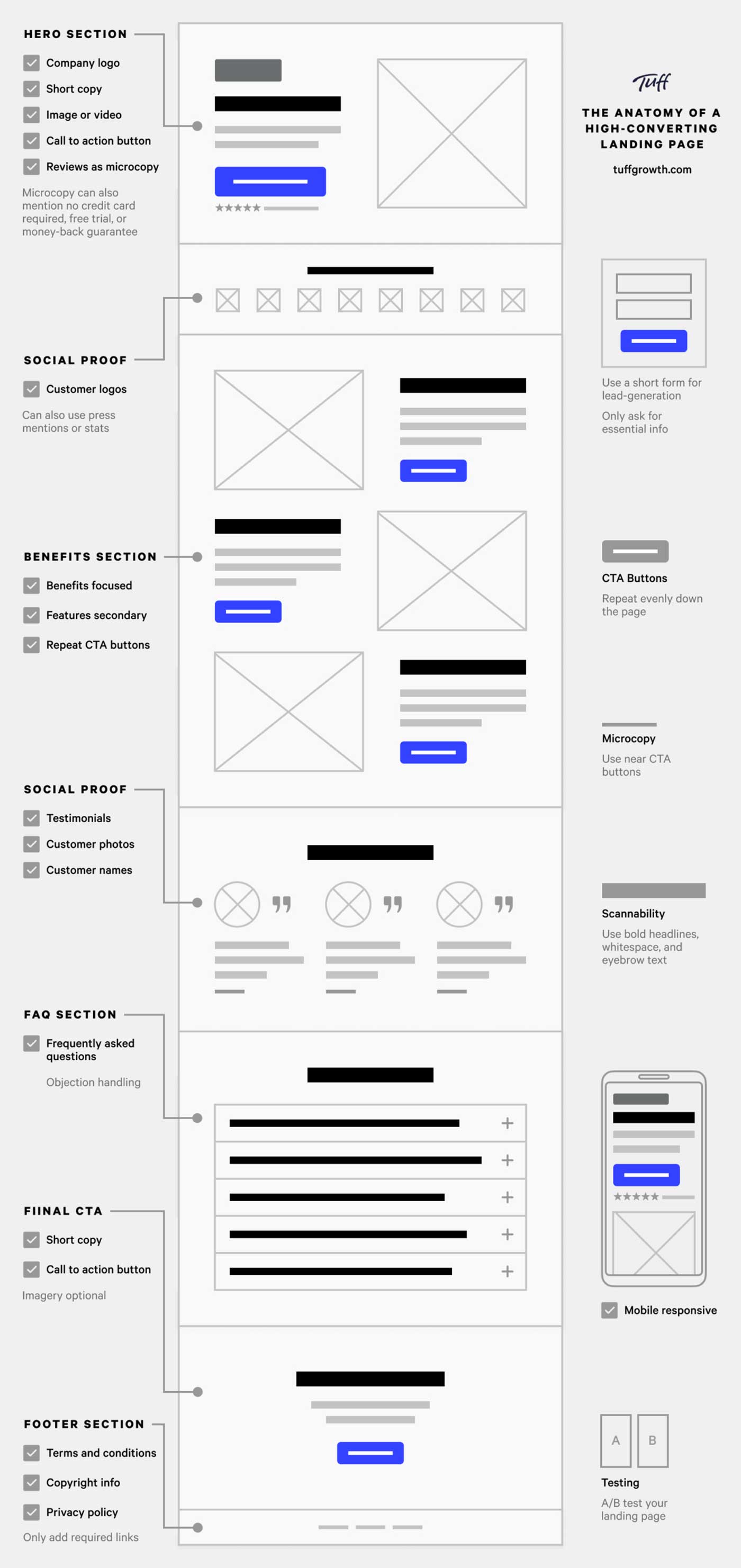
Thanks to our friends at Tuff Growth for creating this A+ infographic—particularly Sean Tremaine, the genius writer and designer behind it.Let’s dive into each of these sections some more.
✔️ Hero Section:
The hook is everything:
- Header: Clearly state what you do and why it matters.
- Subheader: Expand your headline. How do you do it?
- Image/Video: Visually communicate your product.
- Call-to-Action (CTA): Place an OBVIOUS button that guides the user to the next step.
- Navbar: Key conversion pages/sections only (Pricing, FAQ, Features)—and make it sticky.
✔️ Social Proof #1
Social proof is one of the biggest motivators:
- Display usage numbers or logos of well-known customers to build credibility and trust.
✔️ Benefits/Features Sections:
Features = talking about yourself.Benefits = talking about them.
- Benefit Headers: Clearly state your product or service's main benefits.
- Feature Subheaders: Explain how they get that benefit with your product’s features.
- Image: Use visuals to reinforce the benefits and show your product in action.
- Use bullet points & icons for easy reading.
- Repeat your CTA button for each section.
✔️ Social Proof #2
There’s no such thing as too much social proof.
Go deeper with testimonials/case studies/reviews.
- Testimonials: Include quotes from satisfied customers, ideally with names and photos, to add authenticity.
- Case Studies: Highlight the results your customers have had.
I dove deep into the science of using reviews here.
✔️ FAQ Section:
- Don’t assume they read the page. Repeat key details.
- Handle the most common objection.
- Don't lay on the marketing speak, just give the facts.
Tip: Ask support and sales for common customer questions and objections.
✔️ Final CTA Section:
Make it glaringly obvious how you can help and how they can take action:
- Hammer in the top value prop.
- Make the CTA clear and persuasive.
- If a form, use as few form fields as possible.
✔️ Footer Section:
- Only link to key conversion pages.
- Make it painfully obvious how to contact you.
- Privacy and Cookies Policies and Terms are mandatory.
Note: Of course, you can layer additional sections as appropriate for your startup. You can add pricing sections. Problem agitation. How it works. Product gallery. Your mission. And so on.This is a purely skeleton to build on top of.
Quick Tips
- 90% of the work is done by the hero. Make it hooky.
- Your CTA Button should be the most glaringly obvious thing on the page.
- Be short and clear. Optimize for scannability.
- Mobile friendly is mandatory.
- If you have the traffic volume, A/B test regularly to find the copy and images that convert best. If not, get a lot of feedback from people.
Check this off next time you build an LP, and you'll be ahead of 90+% of folks.
Want to get ahead of the rest?
Get our extremely detailed guide walking you through how to perfect each section.
Something fun